Try It / View the Source
Interactive Sudoku Solver
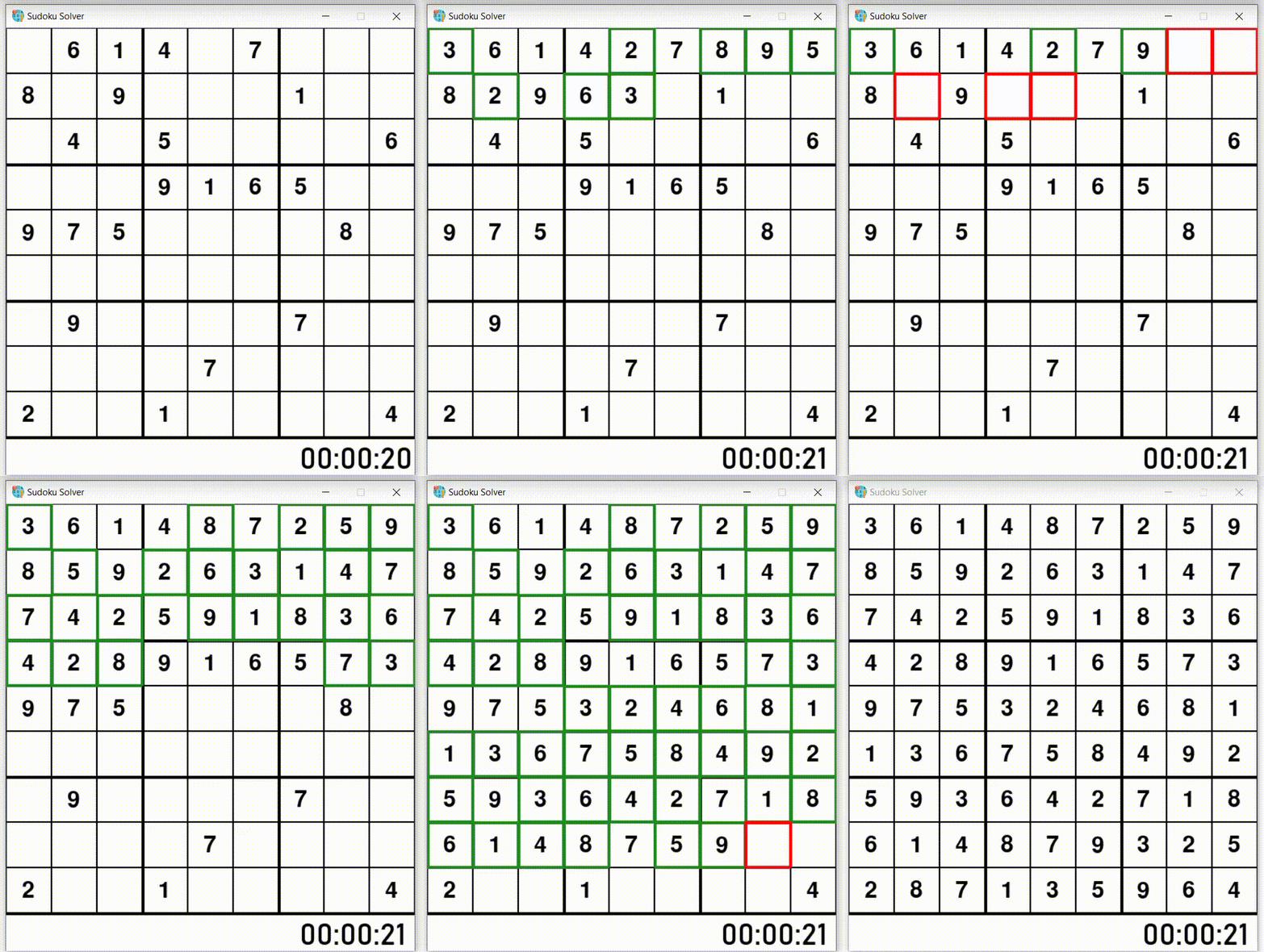
This project is an interactive Sudoku game and visual solver built using Python and Pygame. It allows users to play Sudoku manually, request hints, and watch the algorithm solve the puzzle in real-time using a backtracking approach.
Features
- Random Sudoku board generation
- Mouse-based tile selection and keyboard input
- Visual feedback for correct and incorrect entries
- Hint system to fill a correct number in a random empty cell
- Animated visual backtracking solver that highlights decision-making
- Timer and wrong-attempt counter
How the Visual Solver Works
The solver uses a recursive backtracking algorithm to fill empty cells systematically:
- Find the next empty cell in the grid.
- Try numbers 1–9 and check Sudoku constraints (row, column, 3×3 subgrid).
- If a number is valid, place it and visualize the step on screen.
- If no number is valid, backtrack: reset the cell and mark it as incorrect.
- Repeat until the puzzle is solved.
During the animation:
- Correct placements are highlighted in green
- Incorrect attempts during backtracking are highlighted in red
- A short delay allows users to see the algorithm's decision-making process
Code Example
def visualSolve(self, wrong, time):
    empty = find_empty(self.board)
    if not empty:
        return True
    for num in range(1, 10):
        if valid(self.board, empty, num):
            self.board[empty[0]][empty[1]] = num
            self.tiles[empty[0]][empty[1]].value = num
            self.tiles[empty[0]][empty[1]].correct = True
            pygame.time.delay(63)
            self.redraw({}, wrong, time)
            if self.visualSolve(wrong, time):
                return True
            self.board[empty[0]][empty[1]] = 0
            self.tiles[empty[0]][empty[1]].value = 0
            self.tiles[empty[0]][empty[1]].incorrect = True
            pygame.time.delay(63)
            self.redraw({}, wrong, time)
Why This Project Is Interesting
This project demonstrates:
- Recursive algorithm design and constraint satisfaction
- Depth-first search with backtracking
- Integration of algorithm logic with graphical rendering
- Real-time visualization of problem-solving strategies
If you use or reference this project, please mention me @rustamdurdyyev and him @hdruv on Github. This helps give proper credit and track contributions.